Auto-Merge
Automatically merge GitAuto pull requests when all tests pass and conditions are met. Save time by eliminating manual PR merging for test generation tasks.
How Auto-Merge Works
Auto-merge happens immediately when check suite completes successfully and all conditions are met:
- All status checks pass
- No merge conflicts
- Branch is up to date
- Repository does NOT require reviews (reviews haven't happened yet at this point)
Important:Auto-merge won't work if your repository requires reviews in branch protection. See the configuration section below to learn how to bypass this requirement.
Who Should Use This
Teams with scheduled triggers creating many PRs per day who are already familiar with GitAuto's changes and want to reduce the manual burden of merging PRs they would normally merge without detailed code review when tests pass.
Enabling Auto-Merge
To enable auto-merge for your repository, go to Actions Settings and configure the following:
- Select your repository from the dropdown
- Toggle "Auto-merge" to enabled
- Only test files (optional): Only auto-merge when PR contains exclusively test files
- Merge method: Choose merge, squash, or rebase method
Bypassing Branch Protection Approval Requirements
If your repository requires pull request approvals in branch protection (e.g., "Require 2 approving reviews"), you need to configure GitAuto to bypass this requirement while keeping it for human developers.
Configuration Steps
- Navigate to your repository on GitHub
- Go to Settings → Branches
- Under "Branch protection rules", find your default branch (usually
mainormaster) and click Edit - Scroll down to the "Require a pull request before merging" section
- Check the box: "Allow specified actors to bypass required pull requests"
- In the search field, type git and select gitauto-ai from the dropdown
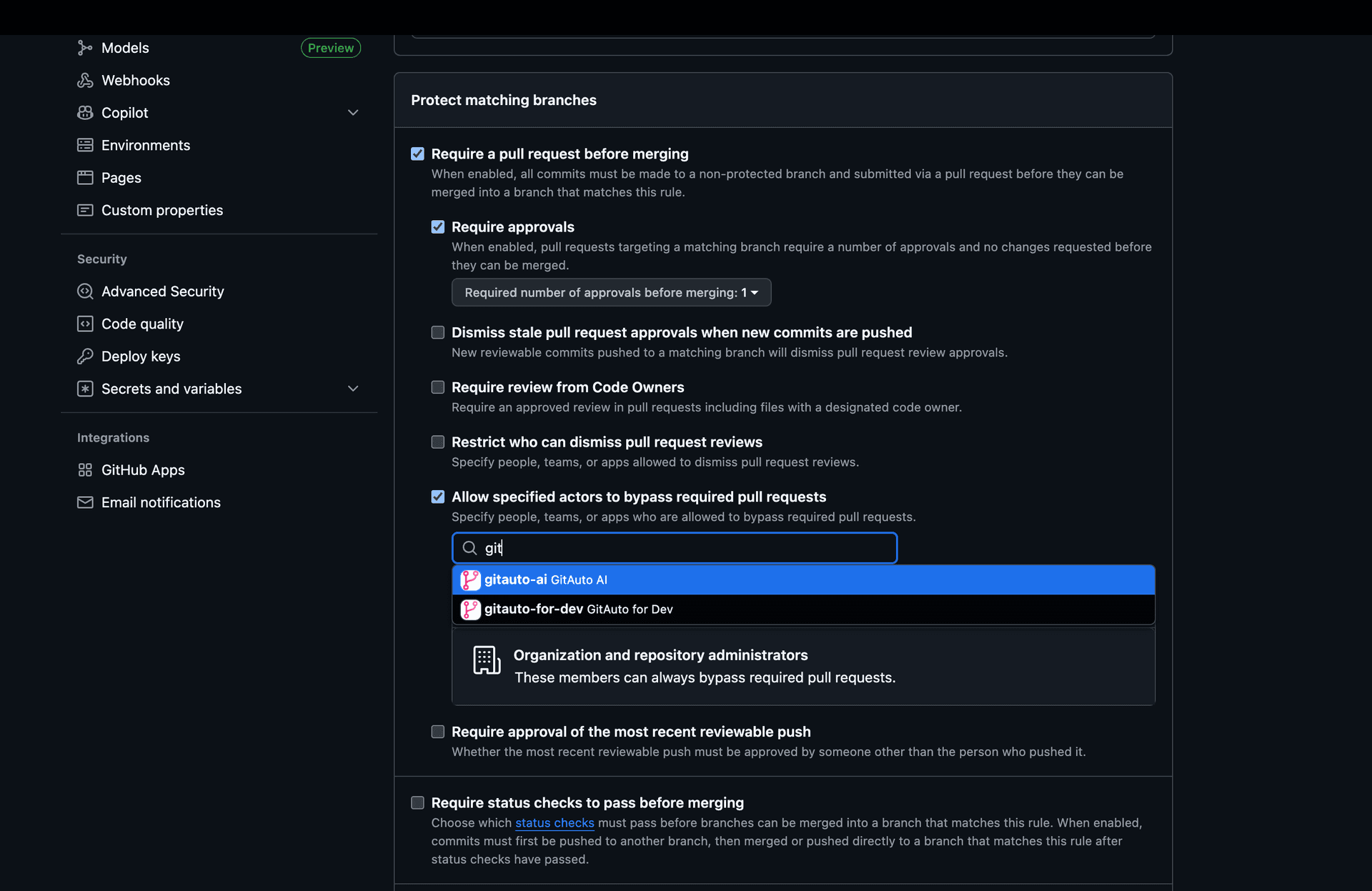
Result:
- Human developers still need approving reviews to merge PRs
- GitAuto can auto-merge its own PRs without approvals when tests pass
- All other branch protection rules remain enforced for everyone
Troubleshooting
If GitAuto cannot merge after configuration:
- Verify GitAuto is installed on the repository
- Check that auto-merge is enabled in GitAuto Actions Settings
- Ensure the branch protection rule is applied to the correct branch
- Confirm all required status checks are passing
- Make sure there are no merge conflicts
- Verify the branch is up to date with the base branch
Need Help Configuring Auto-Merge?
Branch protection rules can be tricky to configure correctly. If you're having trouble getting auto-merge to work with your specific setup, we're here to help!
Contact us and we'll help you get auto-merge working.